


Building RPG: Robotic Planning with Gemini
23 Mar 2026 - 8 min read
Before a robot can do anything useful in an unknown space, you need an extensive understanding of the environment it will operate in. Traditional solutions use SLAM (Simultaneous Localization and Mapping) to create accurate 2D and 3D maps, and also create semantic graphs with pre-tagged objects using sensor rigs like LiDAR or cameras. At the recent Gemini 3 Singapore Hackathon hosted by CerebralValley, Anurag and I wanted to see how far we could get by just leveraging the multimodal capabilities and world understanding of the Gemini models. We developed Robotic Planning with Gemini (RPG), an embodied AI project that lets a robot understand and plan tasks in an unfamiliar indoor environment using only sequential photographs.
1. Pipeline Architecture
The key steps behind RPG are:
- Scene Decomposition: extracting a semantic map from the photos
- Layout Synthesis: converting the semantic map into a 2D floor plan
- Spatial Localization: finding the location of objects on the generated floor plan
- Task Planning: generating a grounded task plan that can be executed by a robot within the detected layout
2. Scene Decomposition
After receiving a set of uploaded images, RPG uses Gemini 3 Flash to analyze all the images together and extract a structured JSON topology of the space. The model is instructed to identify three categories of spatial data:
- Static anchors: large, immovable features such as bookshelves, sofas, or appliances. These form the stable skeleton of the environment.
- Dynamic objects: movable items of interest such as laptops, mugs, and books. These are things the robot might need to interact with.
- Navigable edges: doorways or corridors leading out of the current space.
The following is a snippet of the output generated using images of the pantry at our hackathon venue:
{
  "node_name": "Office Pantry and Coworking Area",
  "static_anchors": [
    {
      "anchor_id": "pantry_counter_cabinet",
      "type": "wooden pantry cabinet",
      "description": "A large floor-to-ceiling wooden cabinetry unit with glass-front upper sections and integrated pantry appliances.",
      "image_indices": [0, 3, 4, 6, 9, 10]
    },
    {
      "anchor_id": "oval_communal_table",
      "type": "oval wooden table",
      "description": "A large, light-topped oval communal table used for collaborative work, situated in the center of the room.",
      "image_indices": [2, 9, 10]
    }
  ],
  "dynamic_objects": [
    {
      "object_id": "coffee_espresso_machine",
      "type": "coffee machine",
      "description": "A black professional espresso machine located on the main pantry countertop.",
      "image_indices": [0, 3]
    },
    {
      "object_id": "blue_backpack",
      "type": "backpack",
      "description": "A blue backpack resting on the floor next to a workstation stool.",
      "image_indices": [7, 8]
    }
  ],
  "navigable_edges": [
    {
      "edge_id": "hallway_exit_path",
      "description": "A corridor leading away from the pantry towards restrooms and building exits.",
      "visual_cue": "Illuminated green EXIT sign and overhead restroom pictograms."
    },
    {
      "edge_id": "phone_booth_entry",
      "description": "Entrance to private glass-walled phone booths for quiet calls.",
      "visual_cue": "Glass door labeled 'PHONEBOOTH'."
    }
  ]
}
3. Layout Synthesis
The goal of this step is to produce a 2D floor plan from the uploaded photos. To maximize the accuracy and detail in our generated map, we used a two-step approach with the help of an intermediary text output.
3.1. Photos to Text
This step prompts Gemini 3 Flash to read all the input photos alongside the generated topology JSON to create a text description of the 2D floor plan.
prompt = """You are an expert architectural draftsperson. Review these sequentially captured
images of a room, and the provided spatial data.

Write a highly detailed, strictly textual description of the floor plan.
Describe the exact shape of the room and the relative 2D positions of all static anchors
and dynamic objects.
Do not describe colors or lighting; focus purely on the 2D geometric layout and object placement.
"""
For the same office pantry run, this step produced the following description:
This office pantry and coworking area is an open-plan space organized into distinct zones for refreshment, collaborative work, and individual focus. Running parallel to a wall of large, floor-to-ceiling windows is a long rectangular window work table. Situated in the open central floor space is a large oval communal table with a light-colored top. Opposite the window wall, the service area is defined by a large pantry counter cabinet. A coffee espresso machine is positioned on this counter, and two built-in microwaves are integrated into the lower cabinetry. Near these workstations is a glass door providing a phone booth entry for private calls.
3.2. Text to Image
We then feed the text description to Gemini 3.1 Flash Image to generate the floor plan, as shown below.
prompt = f"""An orthographic, 2D top-down architectural floor plan.
Perspective is strictly 90 degrees straight down.
Flat shading, flat geometric shapes, no 3D walls, no vanishing points, minimalist blueprint style.
Do not include any text, labels, words, or numbers.

Layout details: {layout_text}"""
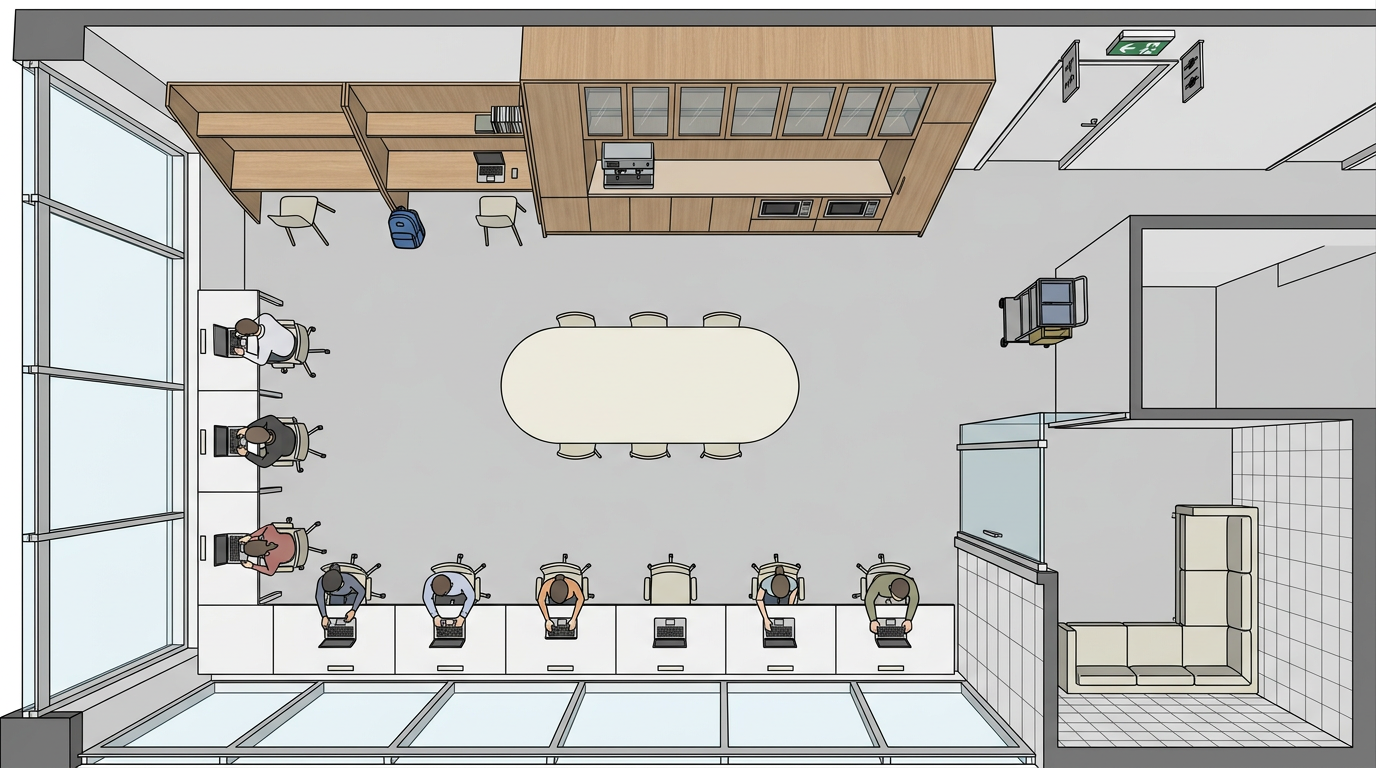
4. Spatial Localization
With the floor plan in hand, we send it back to Gemini 3 Flash along with the list of all anchors and dynamic objects from the topology, and ask for their bounding boxes as percentages of the image dimensions:
prompt = f"""Analyze this floor plan image. Locate the following objects and provide their bounding boxes.
Objects to locate:
{objects_list}

Return as a JSON array. Each item must have: object_id (string), ymin (number 0-100),
xmin (number 0-100), ymax (number 0-100), xmax (number 0-100).
Coordinates are percentages of image dimensions. Ensure ymin < ymax and xmin < xmax."""
Here is what a sample output would look like for our pantry:
[
  {
    "object_id": "pantry_counter_cabinet",
    "ymin": 5, "xmin": 35, "ymax": 30, "xmax": 95
  },
  {
    "object_id": "oval_communal_table",
    "ymin": 35, "xmin": 30, "ymax": 65, "xmax": 70
  },
  {
    "object_id": "coffee_espresso_machine",
    "ymin": 8, "xmin": 60, "ymax": 20, "xmax": 75
  },
  {
    "object_id": "blue_backpack",
    "ymin": 55, "xmin": 5, "ymax": 70, "xmax": 18
  }
]
5. Task Planning with Embodiment Awareness
Once the environment is mapped, users can interact with the generated map and topology graph. They can also prompt RPG with a task to carry out in this environment using natural language. RPG then uses Gemini 3 Flash to generate a Directed Acyclic Graph (DAG) of subtasks, with each node containing an action, referenced objects, dependencies, and a physical location on the floor plan.
We additionally define a list of allowed actions for our three currently supported embodiments: humanoids, quadrupeds, and mobile bases, to constrain the actions that the planner can output.
ALLOWED_ACTIONS = {
    "humanoid": {
        "navigate", "move_to", "pick_up", "place", "grab", "carry", "open",
        "close", "push", "pull", "reach", "lift", "lower", "pour", "turn_on",
        # ... 70 actions
    },
    "quadruped": {
        "navigate", "move_to", "patrol", "inspect", "monitor", "push_low",
        "nudge", "follow", "guard", "detect", "sniff", "alert", "wait",
        # ... 25 actions
    },
    "mobile_base": {
        "navigate", "move_to", "sweep", "clean", "mop", "vacuum", "avoid",
        "patrol", "cover_area", "dock", "undock", "wait", "inspect_floor",
        # ... 21 actions
    },
}
These actions are fed into the system prompt with a small description of the capabilities of the robot. For instance, the quadruped prompt includes the following:
“Do NOT plan subtasks that require reaching high spaces (shelves, high cabinets, countertops, tables above low height). Do NOT plan grasping or manipulating objects not at floor level. If the goal inherently requires high reach, only plan the parts the quadruped can do and omit impossible parts.”
When asked to clean the pantry using a humanoid, the planner produced the following DAG:
Task 1: Navigate to the cleaning cart
Task 2: Grab the handle of the cleaning cart
Task 3: Push cleaning cart to pantry counter cabinet
Task 4: Wipe down the surfaces of the pantry counter cabinet
...
Task 7: Push the cleaning cart to the oval communal table
6. Validation and Grounding
After the model generates a task DAG, two post-processing steps are performed before returning the plan to the user.
Deterministic grounding replaces any missing location coordinates with the bounding box values computed during spatial localization. This involves mapping entity IDs referenced by the planner back to the coordinates generated in the previous step.
Structural validation then runs the following checks on the plan:
- Ensure that there are no duplicate task IDs
- All previous task dependencies exist
- All referenced object IDs are present in the topology
- There are no cycles in the dependency graph
- The dependency graph nodes and edges match the subtask list
- All location coordinates are valid
- Every action is in the allowed set for this robot type
If validation fails, the system sends the original output, the list of validation errors, and the grounded context back to Gemini 3 Flash with a repair prompt.
7. Conclusion
RPG was my first robotics-related project. It was great to learn more about a new field, and getting shortlisted in the top six and pitching RPG to the judges was a great experience. I’d like to extend my thanks to Google and CerebralValley for organizing the event.
There are two clear directions for further improving this system. The first is improving the quality of input data. The perception pipeline is only as good as the photos it receives, and a more structured capture process would drastically improve the topology and floor plan outputs. The second is the agent harness. A more capable agentic loop with memory and multi-step replanning would be able to process much more complex layouts and tasks.
If you’re working on embodied AI or want to chat, feel free to reach out to me or Anurag!